
Are you tired of paying for Midjourney? Furthermore, are you frustrated by daily limits and watermarks on free tools? In this tutorial, you will learn how to build a free AI image generator using Cloudflare Workers AI and N8N. Because this setup uses the Flux model, you get high-quality results with no subscription required.
Download Template: HERE
What You Need for This Free AI Image Generator
You only need two things to get started. Therefore, setup is quick and simple.
First, you need a Cloudflare account. It is free to sign up at cloudflare.com. You do not need a domain or any paid plan. Additionally, you do not need a credit card.
Second, you need N8N. This is the automation tool that powers the workflow. You can use N8N Cloud, which has a free trial. Alternatively, you can self-host it on your own machine using Docker.
How to Set Up Cloudflare for Your Free AI Image Generator
Follow these steps to configure Cloudflare. Because the setup only takes a few minutes, you will be generating images fast.
- Log into your Cloudflare dashboard at dash.cloudflare.com
- Click your profile icon in the top right
- Go to My Profile, then click API Tokens on the left
- Click Create Token
- Select the Workers AI Use Template
- Click Add More, choose Account, then Account Settings, then Read
- Click Continue to Summary, then Create Token
- Copy the token immediately. Cloudflare will only show it once.
How the N8N Workflow Works
The workflow has 8 nodes in total. Therefore, it is clean and easy to follow. Let me walk you through each one.
On Form Submission is your trigger. It is a web form with three fields: height, width, and your prompt. Furthermore, smart defaults kick in if you leave fields blank. For example, width defaults to 1681 and height defaults to 1080.
Check Image Size is a simple guard node. If width times height is greater than 1,048,576 pixels, the workflow stops. Consequently, this prevents Cloudflare from rejecting oversized requests.
Get Accounts calls the Cloudflare API to retrieve your account ID automatically.
Flux Schnell Image is the star of the show. It sends your prompt, seed, dimensions, and step count to Cloudflare’s Flux 1 Schnell model. As a result, it returns raw image data.
Convert to File converts that raw base64 image data into an actual binary file.
Edit Image resizes the output to your exact target dimensions.
How to Connect Your Cloudflare Token to N8N
Click on the Get Accounts node and create a new credential. You can call it Cloudflare Worker AI. Then choose Bearer Token Authentication. Paste your API token into the token field and save. Additionally, click the Flux Schnell image node and select the same credential from the dropdown. That is all you need for credentials.
Testing Your Free AI Image Generator
Now activate the workflow. You will see three fields. For example, try these settings:
- Height: 768
- Width: 1024
- Prompt: A lone astronaut standing on Mars, golden sunset, ultra realistic cinematic lighting
Hit Submit. Because Flux is fast, your image will generate in seconds. No subscription, watermark, or daily limit drama.
Pro Tips to Get the Most Out of This Free AI Image Generator
Tip 1: Understand the 1 Megapixel Limit
Cloudflare’s Flux model caps at 1 megapixel. Therefore, 1024 x 768 works at 786,432 pixels. However, 1920 x 1080 does not work because it exceeds the limit at 2,073,600 pixels. The workflow already blocks oversized requests with a clean error instead of a confusing API failure.
Tip 2: Tweak the Steps for Your Free AI Image Generator
The workflow defaults to four steps. This is the Schnell (fast) setting. You can increase it slightly for more detail. However, longer step counts mean longer generation times.
Tip 3: Use the Seed for Reproducibility
Every run generates a new random seed. Therefore, if you get an image you love, grab the seed value from the execution data. You can then hard-code it in the setup node to reproduce near-identical images with different prompts.
Tip 4: Extend the Workflow
This workflow ends at a resized image. However, you can extend it further. For instance, you could auto-post images to social media or chain multiple AI models together. N8N makes all of this possible with just a few more nodes.
Tip 5: Cloudflare Workers AI Free Tier
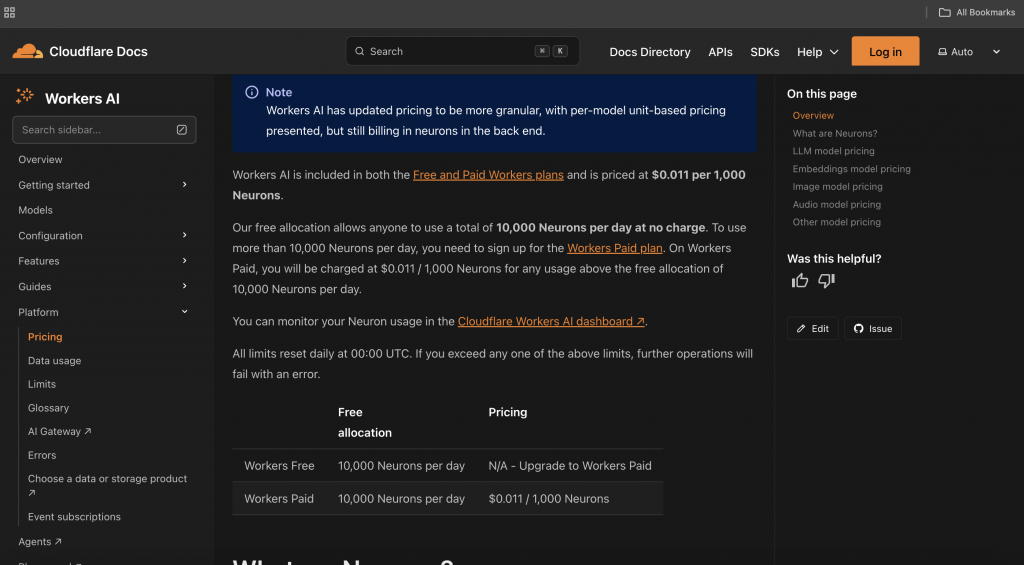
As of now, Cloudflare offers 10,000 neurons per day for free on Workers AI. Image generation consumes more neurons per request than text. However, you can still generate a healthy number of images per day without spending a cent. Check the Cloudflare docs for the latest limits.
Conclusion
You now have a fully working free AI image generator. It is powered by Cloudflare’s Flux model, automated with N8N, and completely yours to customize. Because the setup is free and open, there are no limits on what you can build. Explore more AI automation tutorials on AI Mind Blown, or visit the N8N documentation for more workflow ideas.
Want to see how to extend this workflow to auto-post images to social media? Leave a comment below.